
Concept Information
Patient Data Import into Peer Review
Related Tasks
Managing a Submitted Peer Review File
Adding Patients Involved to a Peer Review File
Adding a Reviewer or Provider to a Peer Review File
Sending a Notification to a Provider
Creating Actions for a Provider
Adding an Event to the Timeline in Peer Review
Editing or Deleting a Timeline Event
Sending Notification to a Reviewer
Viewing, Editing, and Resending a Request
Committee members can assign multiple reviewers to a provider or event .
Note: Before you can assign reviews in the Review/Analysis tab, you must add all the reviewers and providers for the investigation in the Persons Involved tab.
Prerequisites: You must have the 'View File' and 'Edit File' functions enabled for your role.
To assign reviews:
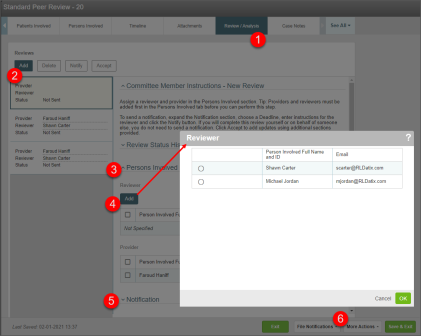
- Open the file and go to the Review/Analysis tab.
- Click Add to add a new card in the left panel.
- In the right panel, go to the Persons Involved section.
- Click Add above either the Reviewer or Provider section. The corresponding
- Note: If only one reviewer or provider has been added in the Persons Involved tab, that person is added automatically and the selection dialogue does not appear.
- (Optional) Use the Notification section to send notification to the reviewer. For more information, see Sending Notification to a Reviewer
- Go to More Actions > Save to save the file.
For more information, see also: